Sensor Addon Datasheet
Overview
The Sensry Sensor Addon extends the Nordic Semiconductor nRF54L15 DK and nRF54LM20 DK with motion, environmental, light and sound sensing. It connects to the DK through three expansion headers. The DK provides the processor and Bluetooth LE connectivity.
The board can be used to develop sensor applications and to explore the Kallisto sensor platform with adapted Kallisto firmware and Sensry Toolbox. Hardware features and firmware support must be considered separately; the presence of a component does not imply support in every firmware version.
General Information
| Item | Applies to |
|---|---|
| Product | Sensry Sensor Addon for Nordic nRF54 development kits |
| Hardware design | v1.1 |
| Compatible kits | nRF54L15 DK and nRF54LM20 DK |
Board views
| Top view | Bottom view |
|---|---|
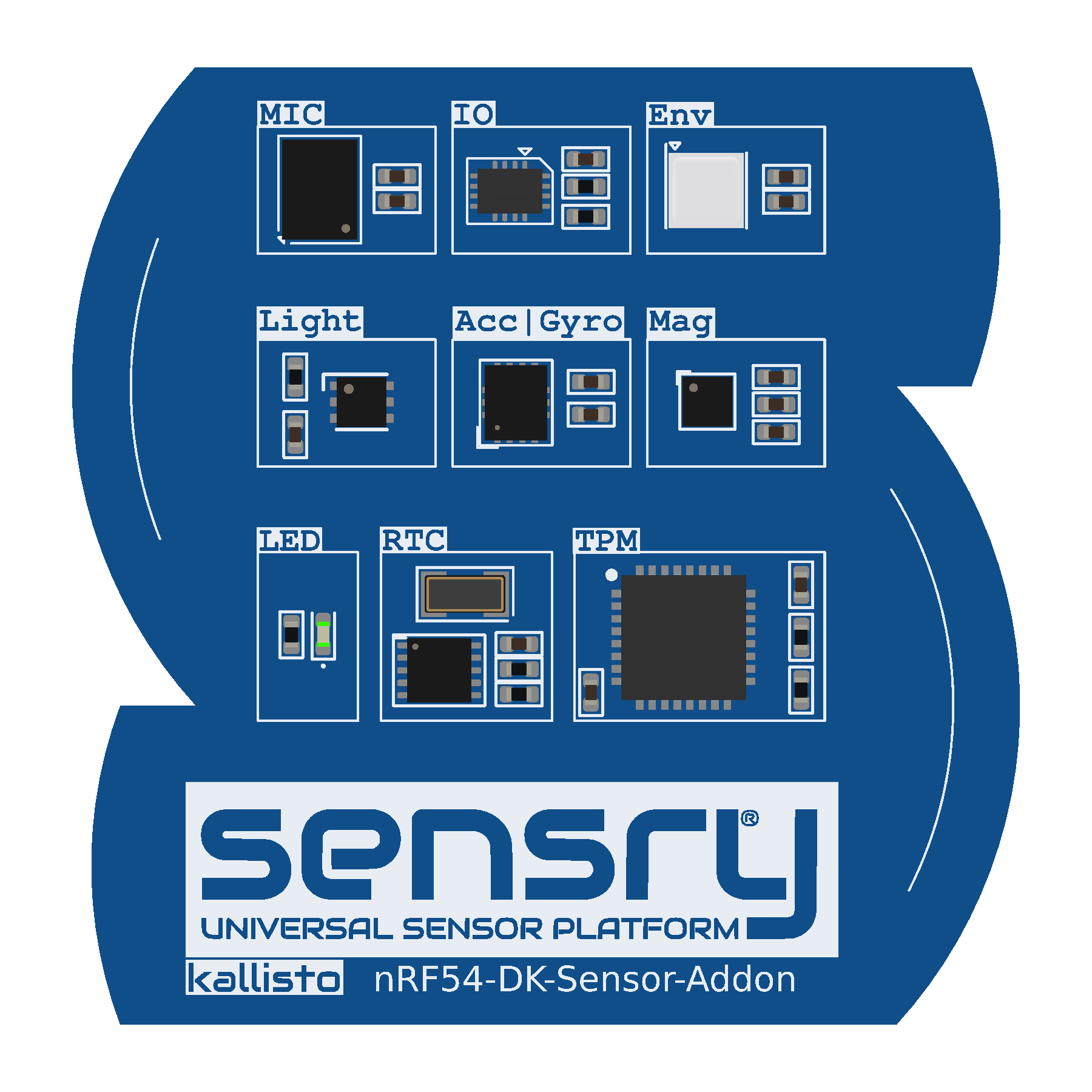 |
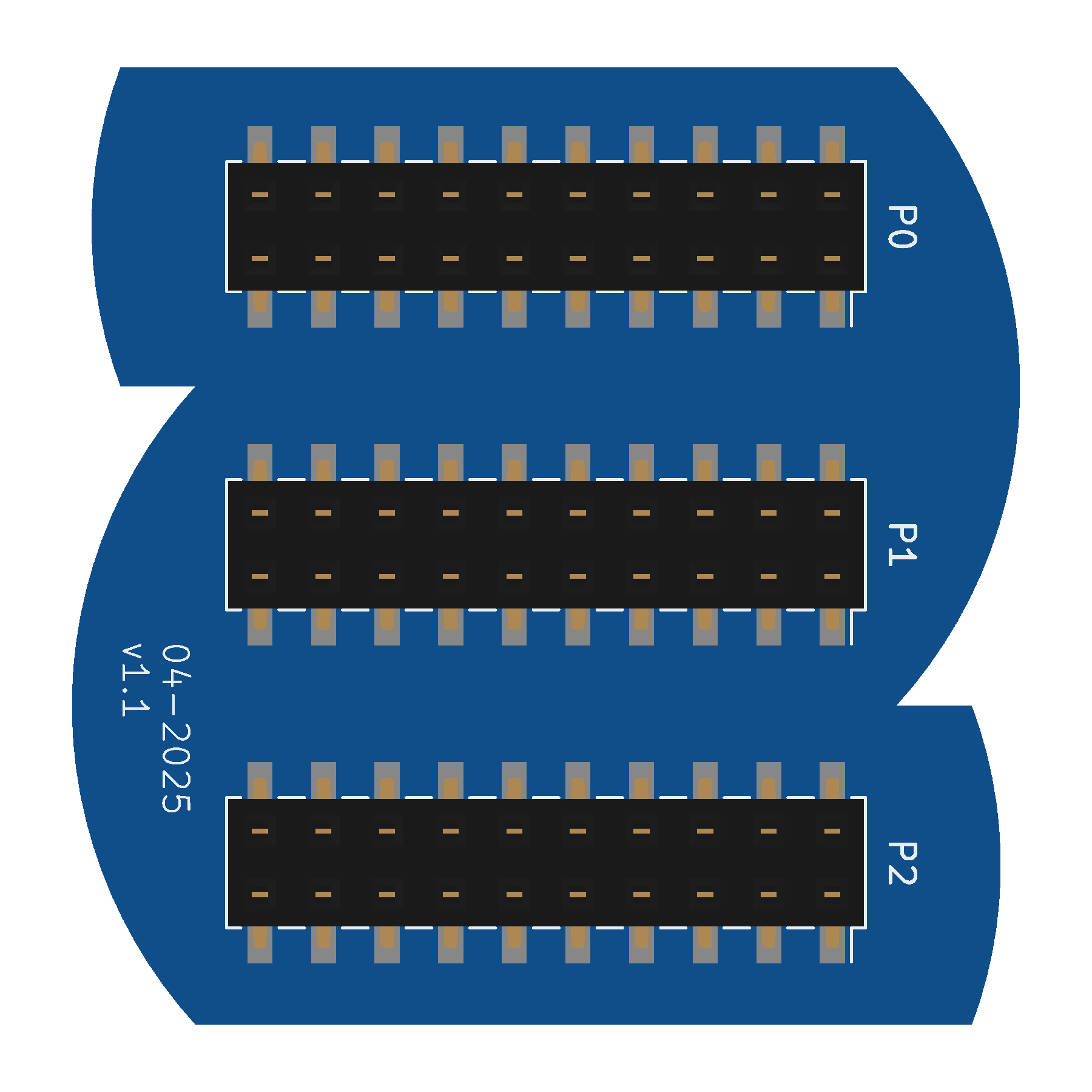 |
Features
- Sensors
- BMI270 three-axis accelerometer and three-axis gyroscope.
- LIS2MDL three-axis magnetometer.
- BME680 gas, pressure, temperature and humidity sensor.
- OPT3002 light-to-digital sensor.
- SPK0641HT4H-1 digital MEMS microphone with PDM interface.
- Peripherals
- PCF85263ATL real-time clock with a 32.768 kHz crystal.
- TCAL6408RSVR I²C I/O expander.
- SLB9670VQ20FW785XTMA1 Trusted Platform Module (TPM).
- User LED controlled through the I/O expander.
- Connectors
- Three 20-pin, 2.54 mm-pitch sockets for connection to the DK.
Programming & software support
Zephyr shield
The Sensor Addon is available as a shield in the Zephyr Project for developing custom sensor applications.
Kallisto firmware
Ready-to-use Kallisto firmware is available for the nRF54L15 DK and nRF54LM20 DK with Sensor Addon. Use the firmware image for your DK.
Programming with nRF Connect for Desktop
You need the DK with Sensor Addon, a USB data cable, the matching firmware image, and nRF Connect for Desktop with its Programmer app installed.
- Connect the DK's on-board debugger USB port to your computer and power on the DK.
- Open nRF Connect for Desktop and launch Programmer.
- Choose your DK under Select device. The app displays the connected device.
- Use Add file to load the matching firmware image, or drag it into the file memory layout. Check that the intended image is loaded.
- For programming through the on-board J-Link debugger, select Erase & write. This replaces the existing firmware. Keep the DK connected and powered until Programmer reports successful completion.
- Restart the DK to run the Kallisto firmware.
See Nordic's programming procedure for details.
Sensry Toolbox
With Kallisto firmware installed, the DK and Sensor Addon can be used with the Sensry Web Toolbox and the Sensry Toolbox mobile apps for Android and iOS. Connect over Bluetooth LE to configure sensors and view their measurements.
Sensors
| Component | Reference | Measured quantities | Board interface |
|---|---|---|---|
| BMI270 | U3 | Three-axis acceleration and angular velocity | SPI |
| LIS2MDL | U1 | Three-axis magnetic field | SPI |
| BME680 | U7 | Gas response, pressure, temperature, humidity | I²C |
| OPT3002 | U6 | Light | I²C |
| SPK0641HT4H-1 | MK1 | Sound | PDM |
Air-quality indices and equivalent gas concentrations are processed outputs; their availability and interpretation depend on the software and algorithms used. Sensor output rates and ranges must be configured for the selected firmware.
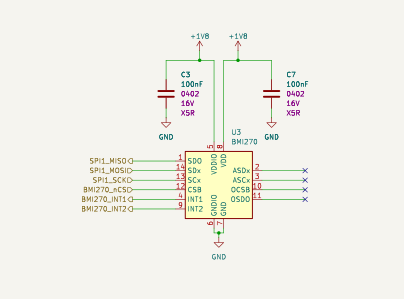
Acceleration and angular velocity
The BMI270 uses the shared SPI bus and SPI_CS0.
Its INT1 and INT2 signals connect to I/O-expander GP2 and GP5.
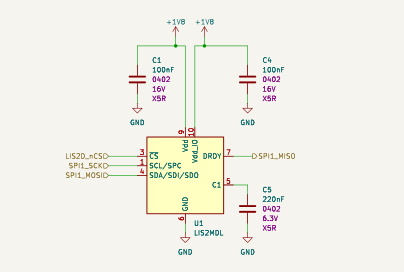
Magnetic field
The LIS2MDL uses the shared SPI bus and SPI_CS1.
Environmental sensing
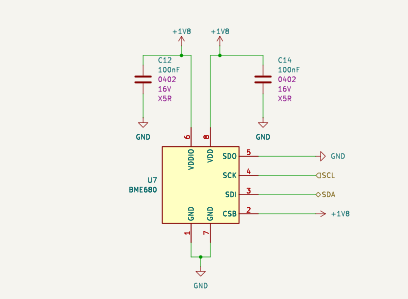
The BME680 connects to the shared I²C bus.
Light sensing
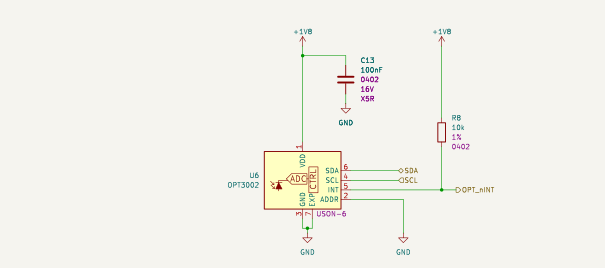
The OPT3002 connects to the shared I²C bus. Its interrupt signal connects to I/O-expander GP1.
Microphone
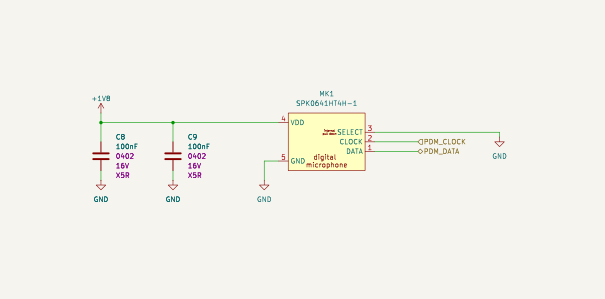
The microphone receives PDM_CLK from the DK and returns PDM_DATA.
Its SELECT input is tied to ground in this design.
Mechanical parameters
| Parameter | Value | Basis |
|---|---|---|
| Model outline envelope | Approx. 37.87 × 38.25 mm | Supplied STEP geometry, X × Y |
| Model assembly height | Approx. 10.20 mm | Supplied STEP geometry, including connectors |
| PCB thickness | 1.6 mm | KiCad board setting |
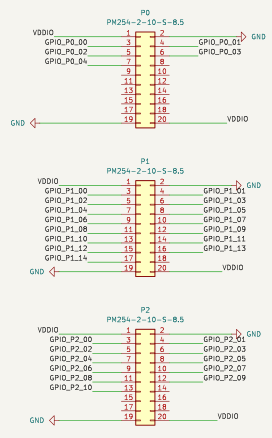
| DK connectors | P0, P1, P2; 2 × 10 pins each | KiCad schematic and layout |
| Connector part | PM254-2-10-S-8.5 | KiCad schematic |
| Connector pin pitch | 2.54 mm | KiCad footprint |
| Adjacent connector-row spacing | 12.7 mm | KiCad connector positions |
The STEP dimensions describe the model envelope, not manufacturing tolerances. Use a released mechanical drawing for enclosure and production tolerances.
Electrical parameters
| Parameter | Value / connection | Conditions |
|---|---|---|
| Supply rail | +1V8, nominal 1.8 V |
Supplied through DK connectors |
| Supply contacts | Pins 1 and 20 on each of P0, P1 and P2 | Connected to the same rail |
| Ground contacts | Pins 2 and 19 on each of P0, P1 and P2 | Common board ground |
| Digital domain | Components supplied from +1V8 |
No level shifter in the design |
The nominal rail voltage is not an input tolerance or an absolute maximum rating. This reference does not specify a board-level supply range, maximum current, power consumption or operating-temperature range.
Pinout
P0, P1 and P2 are the connector designators on the Sensor Addon. The schematic below defines their pin numbering; use the bottom board view to identify the connector side. Do not infer pin numbering by mirroring the top view.
Interface signals
Directions are relative to the Sensor Addon. These signals use the board's 1.8 V supply domain; separate input-threshold and tolerance limits are not specified here.
| Interface / signal | Contact | Direction | Connected function |
|---|---|---|---|
| SPI clock | P2.9 | Input | Shared SPI clock |
| SPI MOSI | P2.11 | Input | Shared SPI controller output |
| SPI MISO | P2.12 | Output | Shared SPI controller input |
| SPI_CS0 | P1.13 | Input | BMI270 chip select |
| SPI_CS1 | P1.17 | Input | LIS2MDL chip select |
| SPI_CS2 | P1.9 | Input | SLB9670 TPM chip select |
| I²C SCL | P1.14 | Input | BME680, OPT3002, RTC, I/O expander |
| I²C SDA | P1.15 | Bidirectional | BME680, OPT3002, RTC, I/O expander |
| PDM clock | P1.7 | Input | Microphone clock |
| PDM data | P1.8 | Output | Microphone data |
The connector schematic labels SPI and PDM signals on DK pins that can also have DK functions. Check the target DK's hardware documentation and application pin configuration before enabling those functions together.
Other peripherals
Real-time clock
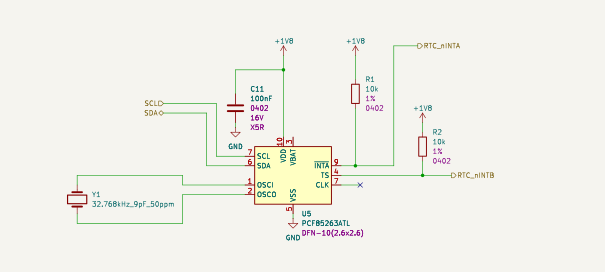
U5 is a PCF85263ATL with a 32.768 kHz crystal and an I²C connection. TS and INTA connect to I/O-expander GP3 and GP4 respectively. The design does not connect the RTC VBAT pin to a backup supply.
I/O expander and user LED
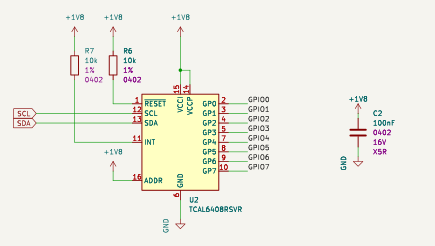
U2 is a TCAL6408RSVR on the I²C bus.
| Expander pin | Board connection |
|---|---|
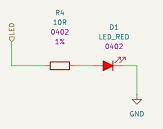
| GP0 | User LED through R4 |
| GP1 | OPT3002 interrupt |
| GP2 | BMI270 INT1 |
| GP3 | RTC TS |
| GP4 | RTC INTA |
| GP5 | BMI270 INT2 |
| GP6 | No peripheral connection |
| GP7 | TPM reset |
The expander INT and RESET signals have pull-ups in the design; they are not connected to the DK headers.
Trusted Platform Module
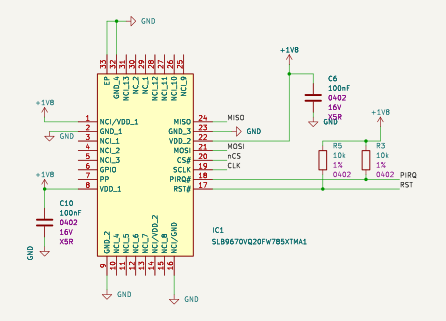
IC1 is an SLB9670VQ20FW785XTMA1.
Its clock, MOSI and MISO connect to the shared SPI bus, and its reset connects to
I/O-expander GP7. Its CS# input connects to SPI_CS2 on DK GPIO P1.06
(connector P1, pin 9).
Block diagram
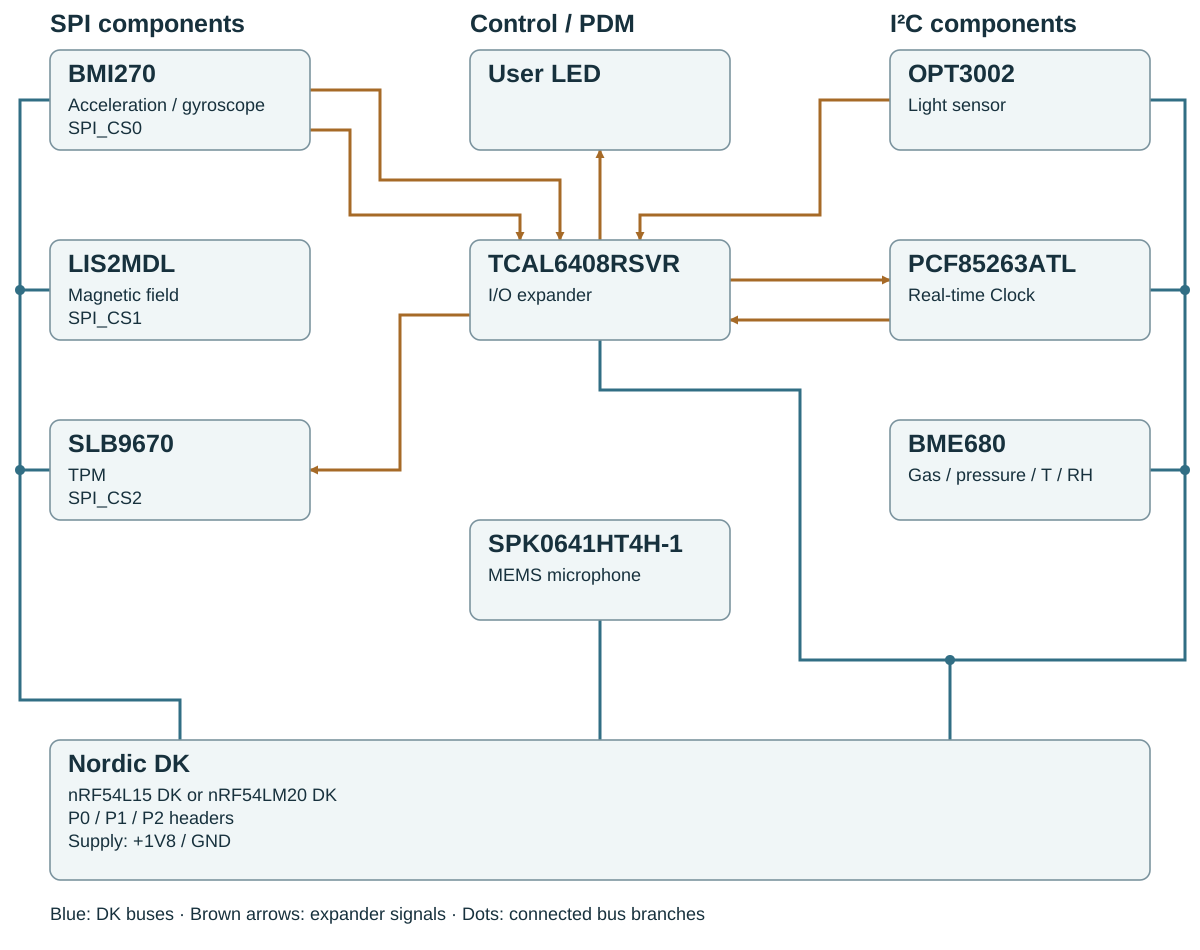
The diagram summarises the connections described above. It does not assert firmware support for every peripheral.